
What we learned at Tourism Innovation Summit in Spain, and what it means for your property
What Peter learned at the Tourism Innovation Summit in Seville about AI, reviews and storytelling, and what it means for your property.
· 9 min read

This is a big one: you can now see how often ChatGPT, Claude and other AI tools read your website, and how many people land on your site from their answers. It's called the AI Assistants View in Springnest Dashboard.
We've been writing a ton about the importance of your website being visible to AI, built features to help you to be seen and understood by AI, and now we're showing you the numbers.
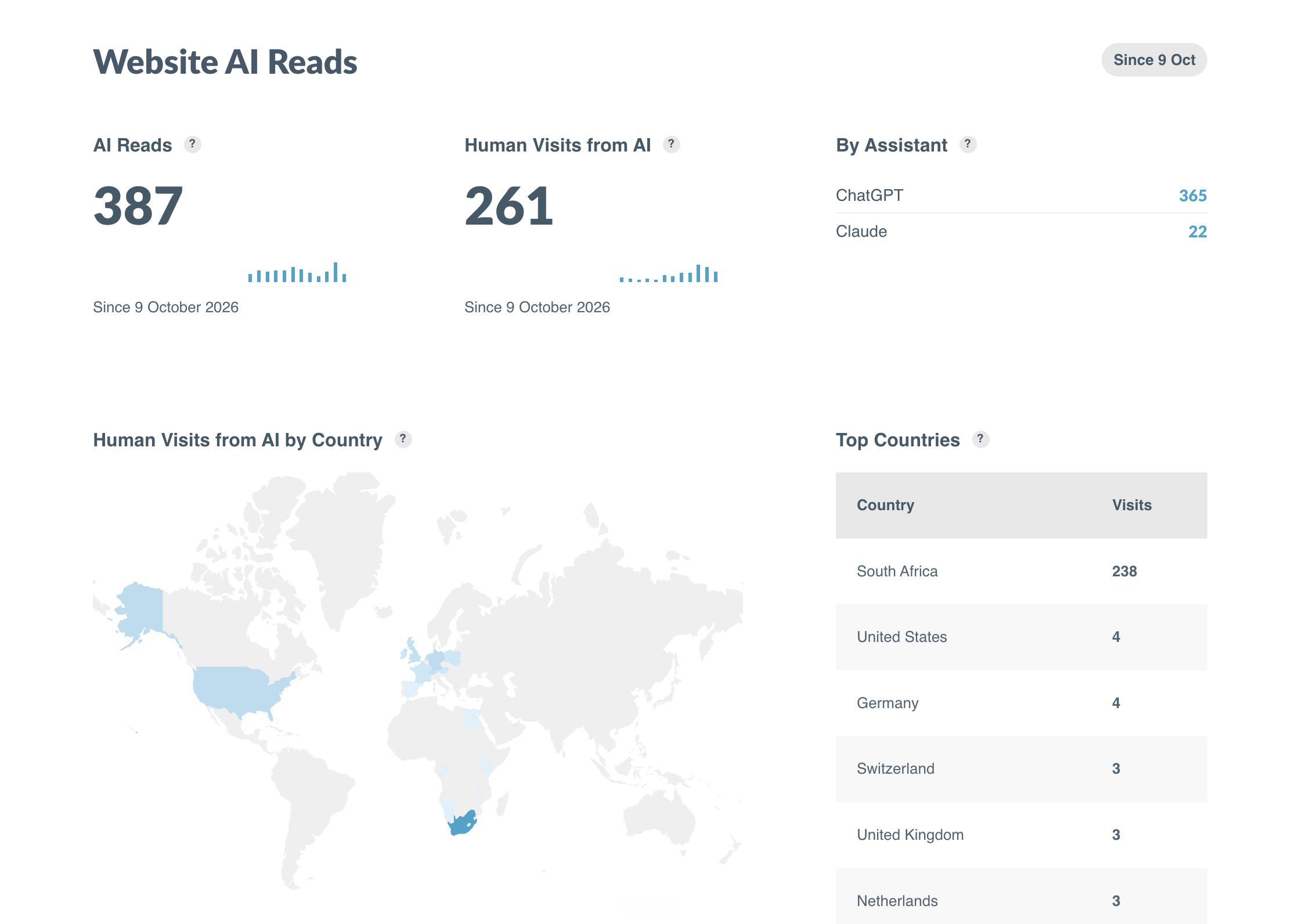
When an AI tool opens a page on your site it leaves a record on our servers, same as any other visitor (most commonly known a visit on your website, nothing new here). Springnest analyses those records once a day, counts the ones that came from AI, and presents them to you in this view.
(Feel free to skip over the next paragraph if you're not interested in nerding out over this)
The counting is the tricky part, and it's quite interesting to understand why. Any bot can name itself ChatGPT or Claude or whatever popular AI tool. That sounds strange, but plenty of software at the moment does that (we saw this first-hand while testing this feature when a tool designed to find vulnerabilities on websites visited Springnest sites while pretending to be different popular AI assistants). Bottom line, if we counted the visits by name alone, it would have put inflated and incorrect numbers on your dashboard (essentially painting a better picture for you than the reality, which is a marketer's nightmare).
So, to ensure we show you the most legitimate data for this view, we check the address each request came from against the list every AI company publishes, and throw out everything that doesn't match. This could mean that your numbers will be lower than what other tools or reports show you, but I'm happy to say that it's honest and real.
Nerd, out.
If you're a smaller or more specialist property, it's ok to expect a handful of reads a week. Zero even, depending on how new your website and brand are. At the time this was written, we hadn't tracked a full month's AI reads and visits yet, so you'll see only a handful of days' worth of data.
We considered waiting until we had more data to show and process before making this live, but we'd rather you start tracking it from here and see it move, than delay giving you access to this information.
I'd suggest looking at the bigger picture: this opportunity for visibility is just going to keep growing. At the Tourism Innovation Summit in Seville this month, Raúl Álvarez Barrera, who leads digital at Radisson, openly spoke about losing about 20% of their search traffic before anyone in their team worked out that AI tools weren't recommending their hotels at all. His more useful point, for us anyway: a small property that's done the work can come up ahead of a chain that hasn't.
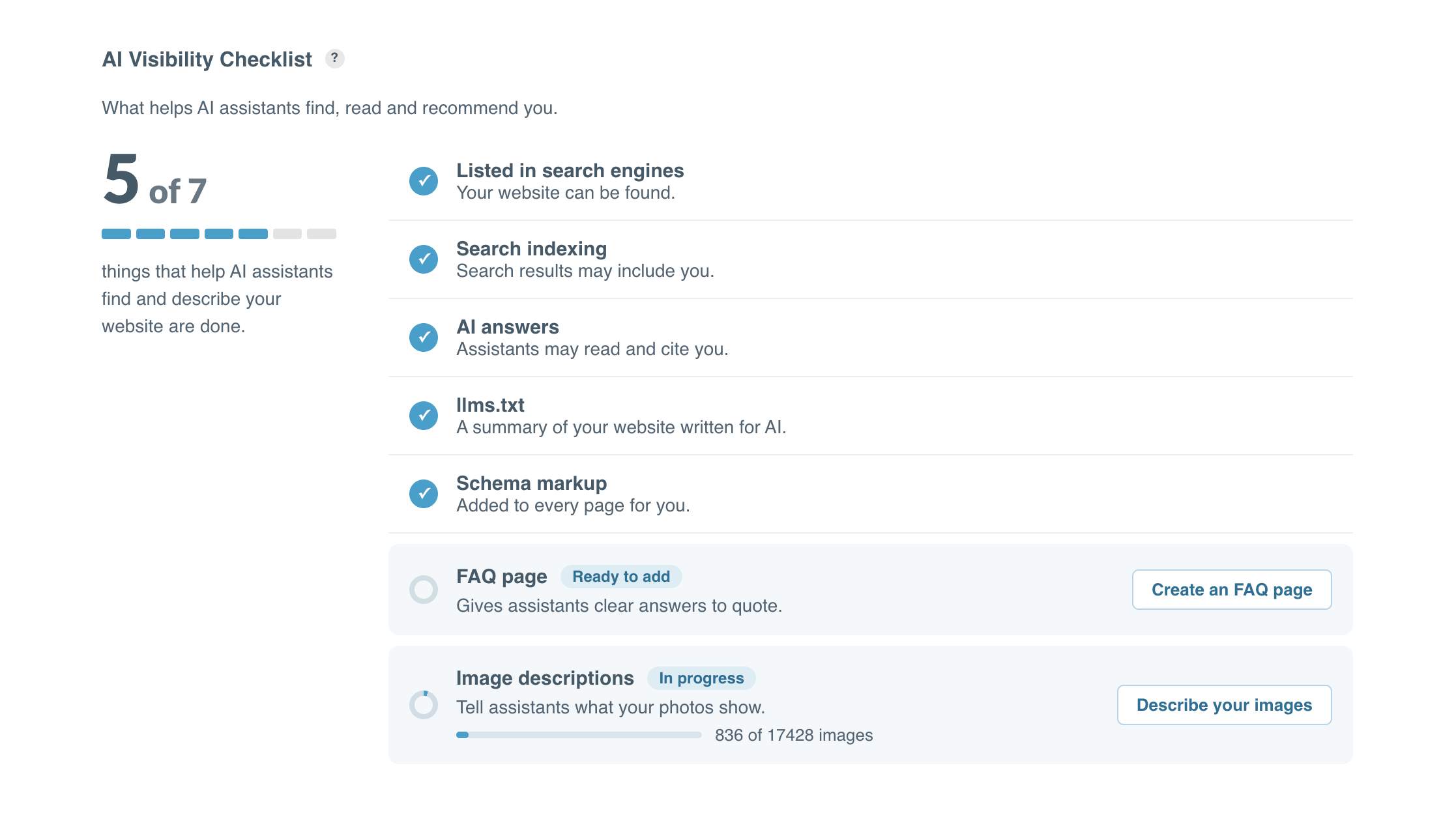
More good news: we've done most of the heavy lifting for you here. Every Springnest page carries schema markup, and your site publishes a summary file (called llms.txt) for AI tools to read. We've also built tools for you to manage how AI may use your site and content, and they're all set to “allow'“ by default.
The two things worth your time:
In Springnest Admin, Click the Dashboard Tab, and Navigate to the AI Assistants section. Be sure to scroll to the AI Visibility Checklist, and see whether you have any tasks to add to your schedule in the coming weeks.
What Peter learned at the Tourism Innovation Summit in Seville about AI, reviews and storytelling, and what it means for your property.
· 9 min read
Generate more menaining conversations from your website with multiple contacts, a welcome message and more design options.
· 2 min read
In August we invested product development time in two specific areas: AI Visibility (more on this in a separate update) and cosmetic design updates.
· 3 min read